


Logiline| Logistic CRM system - Creation of a deal in logistics
To create a deal from an auction lot in the “Auctions” page, click the three dots next to the desired lot (Figure 1, Pointer 1). In the menu that appears, select "Create Logistics deal". As a result, the deal window will open, and the system will automatically fill in all data for the selected lot.
Next, specify the client and the destination country of the deal. After entering this information, click "Save". The created deal will appear on the “Deals” page, and in the lot card, in the "Created Deal Funnel" row there will be an active link you can use to view the full details and history of this deal (Figure 1, Pointer 2).
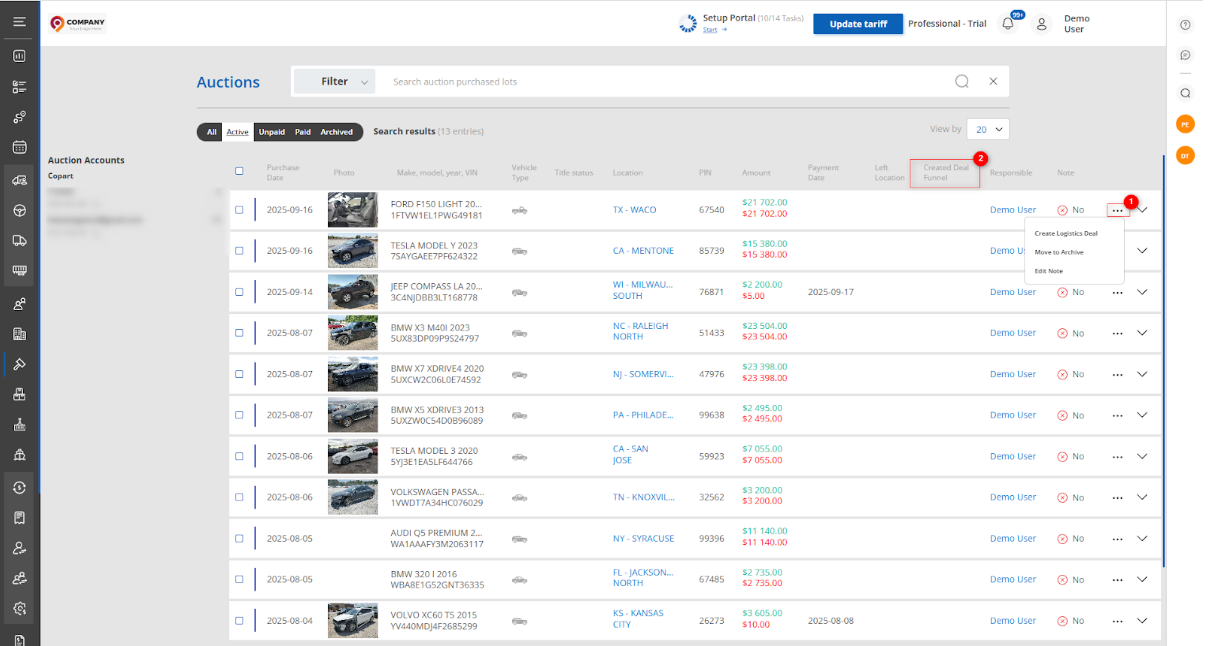 Figure 1 – Site page “Auctions”
Other questions from Logiline| Logistic CRM system
Page "Deals" - List
Form deal
Block "Kanban"
View deal
Copart & IAAI auction invoice generator
Public Auction Payment Upload Page
Loading of customer documents
Public Page for uploading client's documents
Customs invoice generator
Public page for uploading customs payment receipt
How to create requisites for generating invoices for customs expenses?
Setting up required fields for the deal
How do you create a deal?
How does the tracking service work?
How to change the tracking service address?
All question
Site page "Price lists"
How to create a price list?
How to create a copy of a price list?
How to create PDF of price list?
How to export a price list?
How to import a price list?
How to delete a price list?
How to edit the price list?
How to set an individual price list for a client or assign service costs?
How to compare price lists?
All question
Site page "Company Settings"
Site page "Automatization"
Site page "Stage and field customization"
Site page "Field display"
Site page "Warehouses"
Site page "Destination port"
Site page "Terminals"
Site page "Auction Locations"
Site page "Auction Account"
Site page "Customs invoice requisites list"
Site page "Roles & Permissiont"
Site page "Employees"
Site page "Company types"
Site page "Stage Notifications"
Site page "Event Notifications"
Site page "Notification Settings"
Site page “SMTP Notification Settings”
Site page "Notifications log"
Website page “Synchronization of logistic companies”
How does the warehouse page work?
Site page "Containers"
How to create a container?
Site page "Claim Settings"
All question